Hiring Staff, Pool & Motel Expansion
Clean the parking lot and plan staff hiring, pool opening and upstairs renovations.
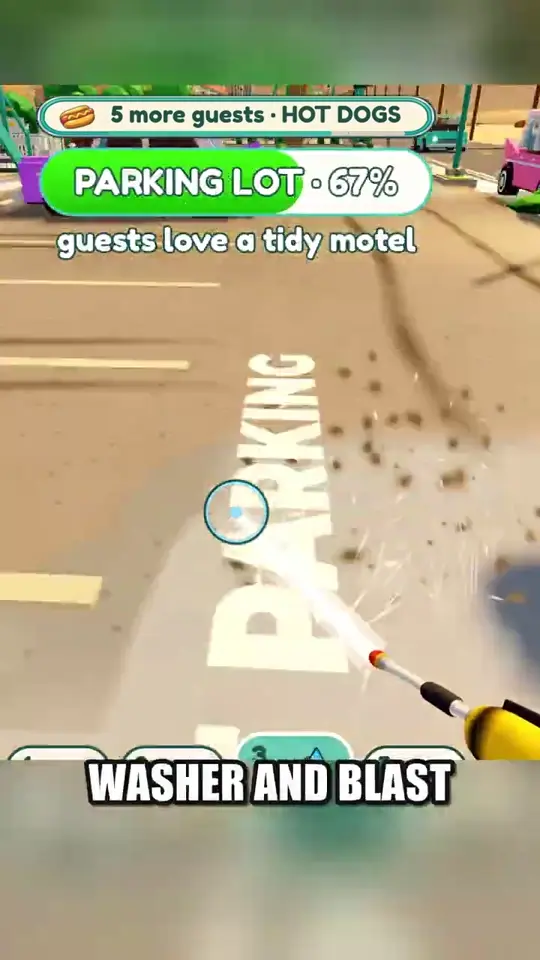
Use the pressure washer on the parking lot
The short recording shows a pressure washer purchase card listing $300 before the cleanup. Read the live purchase prompt, then equip the washer and aim at the dirty pavement. The parking lot meter rises as patches clear. If it stalls, sweep around the curb and parked cars and watch for the meter to move.
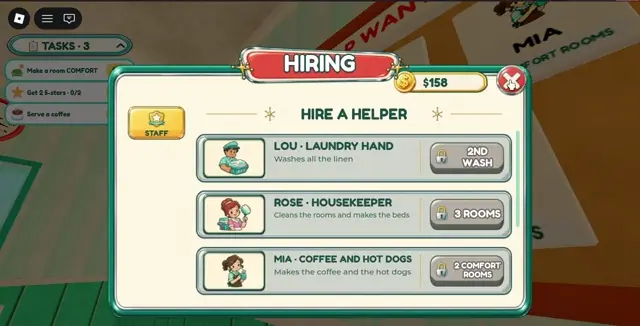
Read each helper unlock in the Hiring menu
The recorded Hiring menu shows Lou washing linen with a 2nd Wash lock, Rose cleaning rooms and making beds with a 3 Rooms lock, and Mia making coffee and hot dogs with a 2 Comfort Rooms lock. Check the current lock label beside the helper you need.
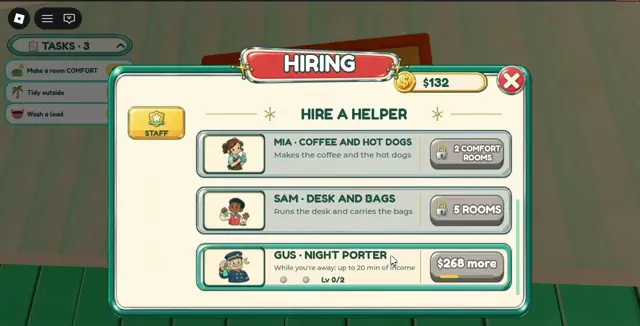
Further down the menu, Sam handles the desk and bags and shows a 5 Rooms lock. Gus is the night porter. His card describes up to 20 minutes of income while away and shows a cash shortfall. Use your own menu to check the hire cost, since the shortfall depends on your balance.
Check the next renovation prompt
The developer confirms the yard, graffiti, neon sign, pool and second floor as renovation projects. Check the active project prompt for its required cash or other conditions before committing. The reviewed footage does not establish the pool or second floor unlock thresholds.